Split Screen vs. Traditional Clipping: Which Gets More Views on Shorts?
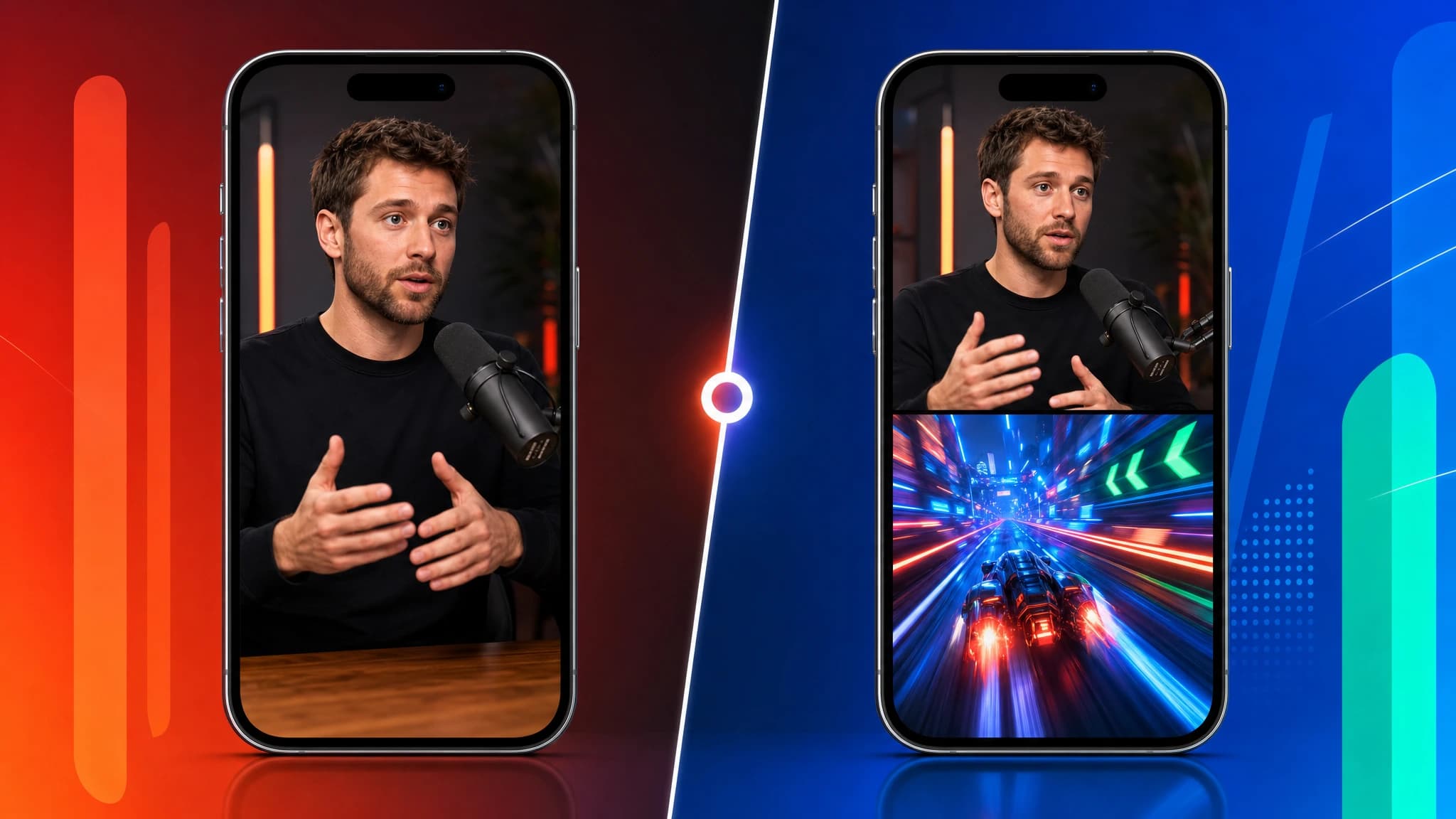
If you spend more than five minutes scrolling through YouTube Shorts or TikTok, you'll notice two dominant formats for faceless content. Many videos are traditional, single-frame clips, usually a talking head pulled from a podcast or interview. Others use a Split Screen format, pairing that same talking head with satisfying gameplay-style footage, sports clips, or drone shots on the bottom half of the screen.
To a casual viewer, the Split Screen format looks chaotic. To a creator who understands algorithmic distribution, it looks like a highly engineered retention mechanism.
But which format actually performs better? The answer depends entirely on the energy of your source material and the psychology of your target audience. Here's how to decide which workflow to use for your next batch of clips.
The Case for Traditional Clipping
Traditional clipping is the standard for a reason. It keeps the viewer's focus entirely on the speaker and the message. The problem is that producing these clips manually takes hours of tedious editing, cropping, and caption syncing. When you use Clipmax's Auto Clipping workflow, the system identifies the most engaging moments, crops the video to a perfect 9:16 vertical ratio, and overlays dynamic captions instantly, so you can produce high-quality traditional clips right away.
This format wins when your source material is inherently high-energy or visually dynamic. If you're clipping a heated debate, an emotional interview, or a speaker who uses a lot of hand gestures and facial expressions, traditional clipping is usually the right choice. The visual information on the screen is already stimulating enough to hold attention.
However, traditional clipping can underperform when the source material is slow-paced. If you're clipping an educational podcast where the speaker barely moves, a single-frame vertical crop might not provide enough visual stimulation to keep the viewer engaged.
The Psychology of the Split Screen
This is where the Split Screen workflow becomes a massive advantage. Split Screen isn't just a stylistic choice; it's a solution to the problem of visual fatigue.
Human attention naturally drifts when looking at a static image. By placing high-motion, satisfying footage on the bottom half of the screen, you create a constant visual pattern interrupt. The viewer's brain is simultaneously processing the audio from the speaker and the visual stimulation from the footage below. This dual-processing keeps them locked in for longer, naturally increasing your average view duration.
Traditional clip
- Speaker carries the screen
- Best when the moment is animated
Split Screen
- Speaker on top
- Gameplay-style motion creates a pattern interrupt
Split Screen is the optimal choice when your source material is highly valuable but lacks visual energy. Financial advice, philosophical monologues, and deep-dive educational content often perform significantly better when paired with Split Screen visuals, because the bottom half of the video carries the visual weight while the top half delivers the value.
How to Execute Both Workflows
The challenge for most creators is that producing both formats manually requires completely different editing processes. Traditional clipping requires precise cropping and caption syncing. Split Screen requires sourcing background footage, aligning two separate video tracks, and making sure the audio mixes correctly.
Clipmax was built to handle both workflows natively, without requiring you to open a complex timeline editor. The Auto Clipping workflow extracts the best moments from any source video and formats them perfectly for a traditional vertical layout. The Split Screen workflow does the same thing, but lets you choose a bottom-half visual from Clipmax's built-in library. The library covers a wide range of categories, from gameplay-style footage to nature scenes, drone shots, sports clips, and a lot more. Every category includes a large variety of segments, which prevents outputs from feeling like the same recycled background on repeat. Other clipping tools tend to recycle the same handful of background videos across thousands of users, which makes the format feel stale. Clipmax's library is built to keep things fresh.
Bottom-half visual library

Gameplay
Racing

Physics

Art
The Verdict
There's no universal winner between Split Screen and traditional clipping. The winner is the creator who knows when to use which format.
If the speaker is animated and the moment is intense, let them own the screen with traditional Auto Clipping. If the speaker is calm and the value is entirely in the words, use Split Screen to keep the viewer's eyes busy while their brain absorbs the message. Test both formats on your account, monitor your retention graphs, and let the data dictate your strategy.
How to Actually Test This on Your Account
The fastest way to find your optimal format is a structured split test. Take a single source video, ideally a long-form podcast or interview, and produce two clips from the same moment. Clip one using Auto Clipping, and clip the second using Split Screen with the same audio. Post both within the same 48-hour window and let the algorithm run its Spark Phase test on each.
After 72 hours, compare the average view duration percentage, not the raw view count. Raw views can be misleading if one clip happened to catch a trending audio or got shared by a larger account. Average view duration is the purest signal of whether your format choice is working. If one format is consistently outperforming the other, you've found your answer for that type of source material.
Run this test across at least three different source videos before drawing a conclusion. Knowing which format your niche responds to is one of the most valuable things you can learn as a creator, and it's a process you can start today.